Intro

Sharing Stories with other Storytellers
Cat Board is an end-to-end platform designed for amateur writers to share their works-in-progress, receive constructive feedback, and support others through peer critique. The platform also fosters connection through a built-in community feature, helping writers find encouragement, accountability, and creative alignment.
Writing is often an isolating and uncertain process, filled with creative, emotional, and structural challenges. Cat Board exists to identify these obstacles and remove them—so writers can focus on bringing their stories to life.
My Role as a UX Designer
Competitive Analysis - Usability scripts - User interviews - User testing - Analyzing feedback - Prioritizing features
Research
Branding - Sketches - Wireframing - Prototyping - Mid-fidelity - Hi-Fidelity - Final product
End-to-End Design
Project through UX/UI Academy, 5 week timeline
Project Overview
Sketchbook - Zoom - Maze - Figma - Group critiques - Mentor Feedback
Tools and Resources
My Role as a UX Designer
Competitive Analysis - Usability scripts - User interviews - User testing - Analyzing feedback - Prioritizing features
Research
Branding - Sketches - Wireframing - Prototyping - Mid-fidelity - Hi-Fidelity - Final product
End-to-End Design
Project through UX/UI Academy, 5 week timeline
Project Overview
Sketchbook - Zoom - Maze - Figma - Group critiques - Mentor Feedback
Tools and Resources
Research
Turn the Competition Into Your Backstory
I viewed four competitors: Scribophile, Critique Circle, qtCircle, and WriteSeen
Strengths
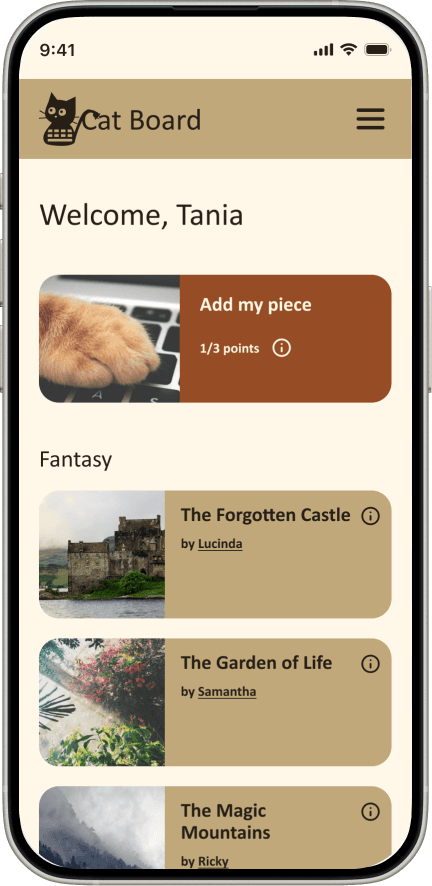
The use of a point system to motivate users to give others feedback on their writing projects
Able to choose preferences of writing projects users would prefer to give feedback on
The use of a point system to motivate users to give others feedback on their writing projects
Simplistic layouts
Pen name
Simplistic layouts
Weaknesses
Lack of personality
Point system taken advantage of
Scribophile takes a while to learn, not intuitive
Research
Turn the Competition Into Your Backstory
I viewed four competitors: Scribophile, Critique Circle, qtCircle, and WriteSeen
Strengths
The use of a point system to motivate users to give others feedback on their writing projects
Able to choose preferences of writing projects users would prefer to give feedback on
Simplistic layouts
Pen name
Weaknesses
Lack of personality
Point system taken advantage of
Scribophile takes a while to learn, not intuitive
Turn the Competition Into Your Backstory
Step Into Their Stories
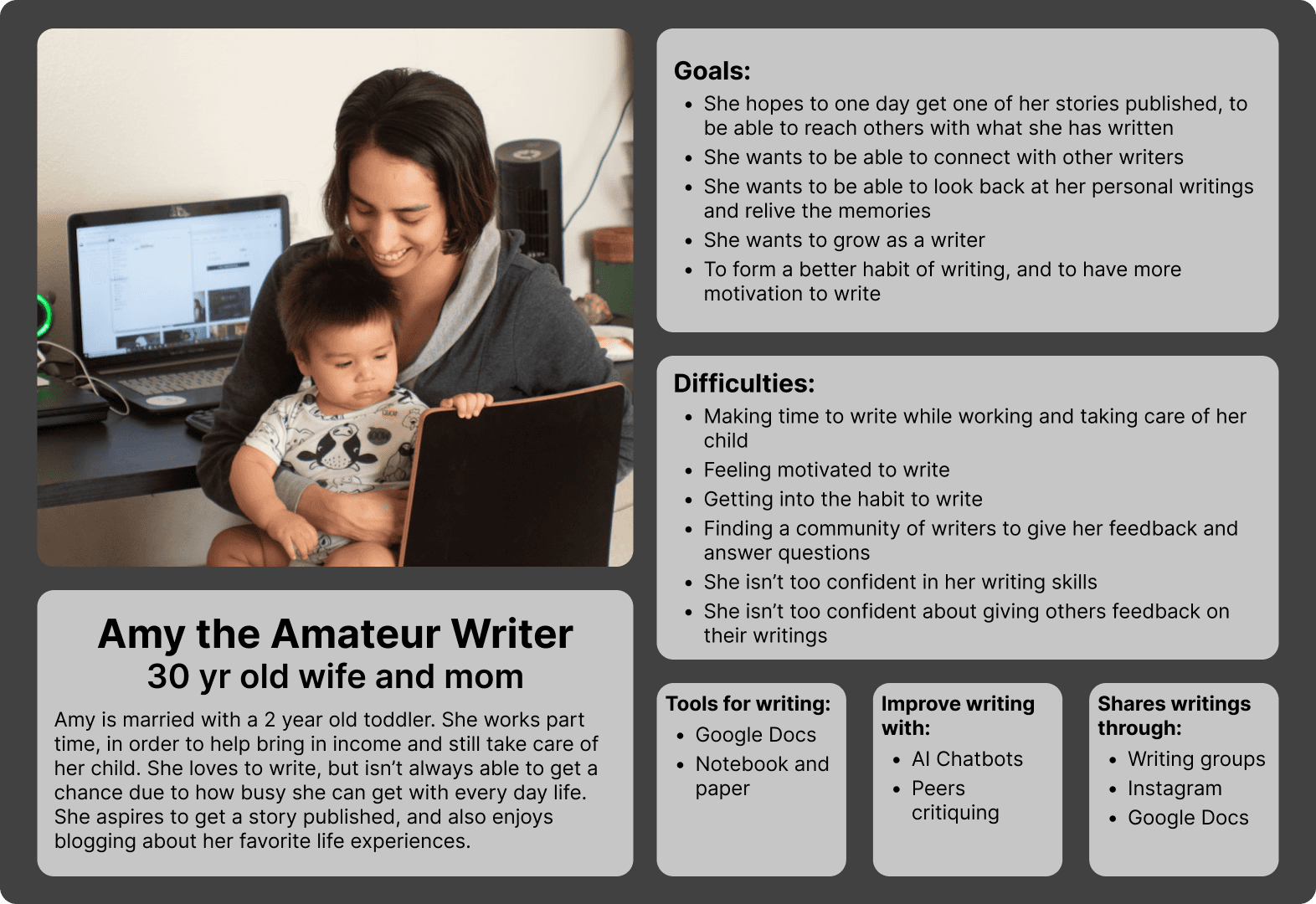
I interviewed four amateur writers—ranging from casual hobbyists to one with professional publishing experience—who wrote across formats including stories, poems, songs, blogs, and articles. Despite their different backgrounds and goals, they shared the same core challenges.
Having a community helped with…
Sharing their work with others increased motivation
Collaborating with peers kept them to stay accountable and on track
Working with others made writing more enjoyable
Sharing their work with others increased motivation
Collaborating with peers kept them to stay accountable and on track
Working with others made writing more enjoyable
Seeing others share unfinished work also reduced fear and boosted confidence when posting their own projects
Valued having a dedicated space to ask writing-related questions and learn from peers
Seeing others share unfinished work also reduced fear and boosted confidence when posting their own projects
Valued having a dedicated space to ask writing-related questions and learn from peers
Other findings…
Time was a major constraint for every participant. While the app couldn’t create more hours in their day, it needed to respect their limited time by being intuitive, fast to learn, and easy to use.
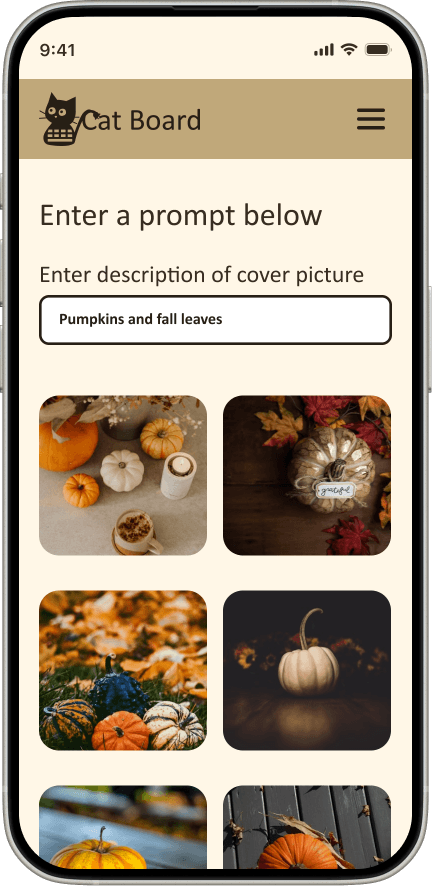
All interviewees also expressed strong interest in being able to upload images alongside their writing, using visuals to add context, inspiration, or emotional depth to their projects.
Time was a major constraint for every participant. While the app couldn’t create more hours in their day, it needed to respect their limited time by being intuitive, fast to learn, and easy to use.
All interviewees also expressed strong interest in being able to upload images alongside their writing, using visuals to add context, inspiration, or emotional depth to their projects.
Step Into Their Stories
I interviewed four amateur writers—ranging from casual hobbyists to one with professional publishing experience—who wrote across formats including stories, poems, songs, blogs, and articles. Despite their different backgrounds and goals, they shared the same core challenges.
Having a community helped with…
Sharing their work with others increased motivation
Collaborating with peers kept them to stay accountable and on track
Working with others made writing more enjoyable
Seeing others share unfinished work also reduced fear and boosted confidence when posting their own projects
Valued having a dedicated space to ask writing-related questions and learn from peers
Other findings…
Time was a major constraint for every participant. While the app couldn’t create more hours in their day, it needed to respect their limited time by being intuitive, fast to learn, and easy to use.
All interviewees also expressed strong interest in being able to upload images alongside their writing, using visuals to add context, inspiration, or emotional depth to their projects.
Intro
Sharing Stories with other Storytellers
Cat Board is an end-to-end platform designed for amateur writers to share their works-in-progress, receive constructive feedback, and support others through peer critique. The platform also fosters connection through a built-in community feature, helping writers find encouragement, accountability, and creative alignment.
Writing is often an isolating and uncertain process, filled with creative, emotional, and structural challenges. Cat Board exists to identify these obstacles and remove them—so writers can focus on bringing their stories to life.
Define
Wrestling With Motivation, Page by Page
Prioritized Features chosen to support and connect amateur writers
Feature for sharing stories, giving and receiving writing projects
Forum feature: to give amateur writers a way to ask each other writing related questions and provide advice
Messages: users able to connect with other writers on a more personal level, providing them a chance to have a writing partner
Cover images: users stated that they liked being able to add pictures to their writing projects, to add to the add visual appeal
Messages: users able to connect with other writers on a more personal level, providing them a chance to have a writing partner
Cover images: users stated that they liked being able to add pictures to their writing projects, to add to the add visual appeal
Your Stories, Our Mission
Supportive collaboration
To support writer growth, the platform prioritizes connection and communication through community features such as messaging, forums, writer connections, and peer feedback.


Integrity
A points-based system encourages users to provide thoughtful, constructive reviews, fostering trust across the platform.
Inviting and Friendly
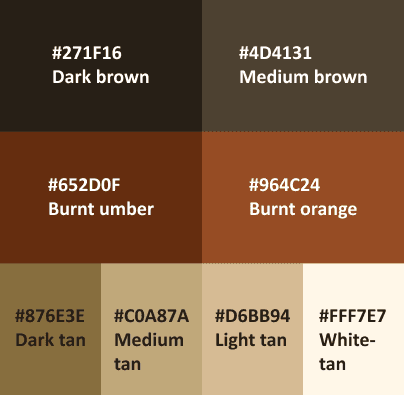
Cat Board is designed with a warm, approachable personality intended to feel inviting and charming to its users. This personality is expressed through thoughtful color choices, visual styling, and a cohesive theme. Typography was selected to balance warmth and approachability with clarity and legibility, ensuring the interface feels welcoming without sacrificing usability.
Imaginative and Innovative
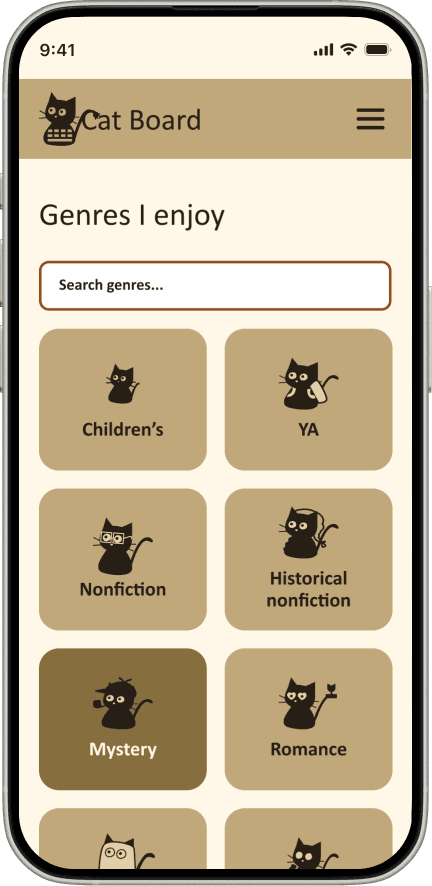
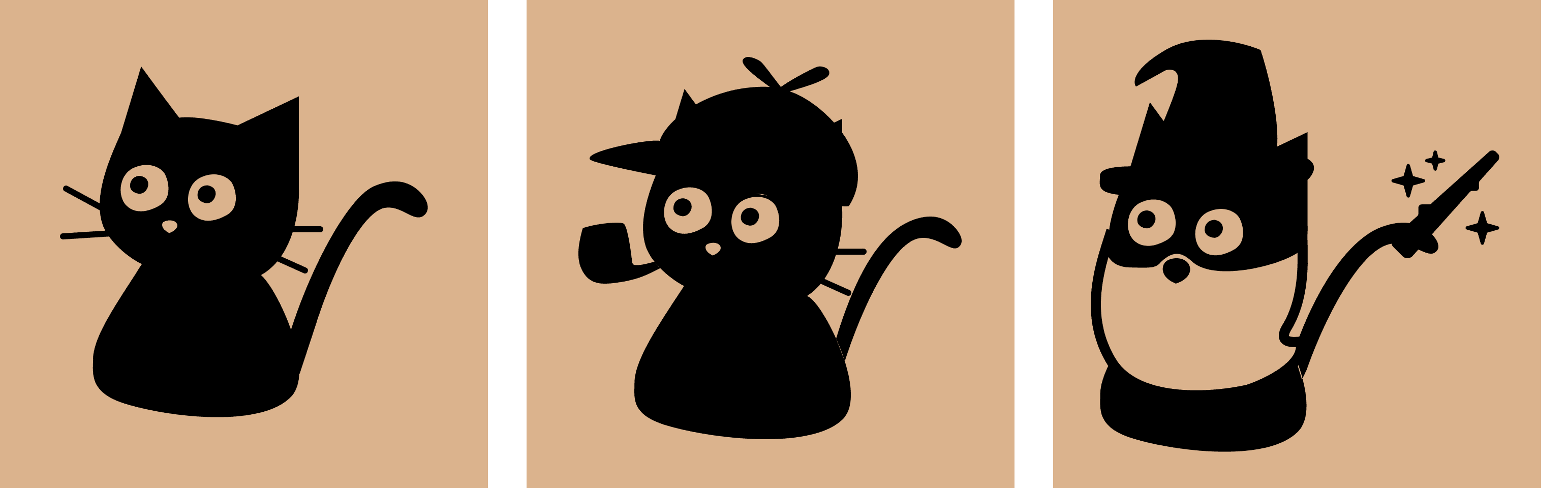
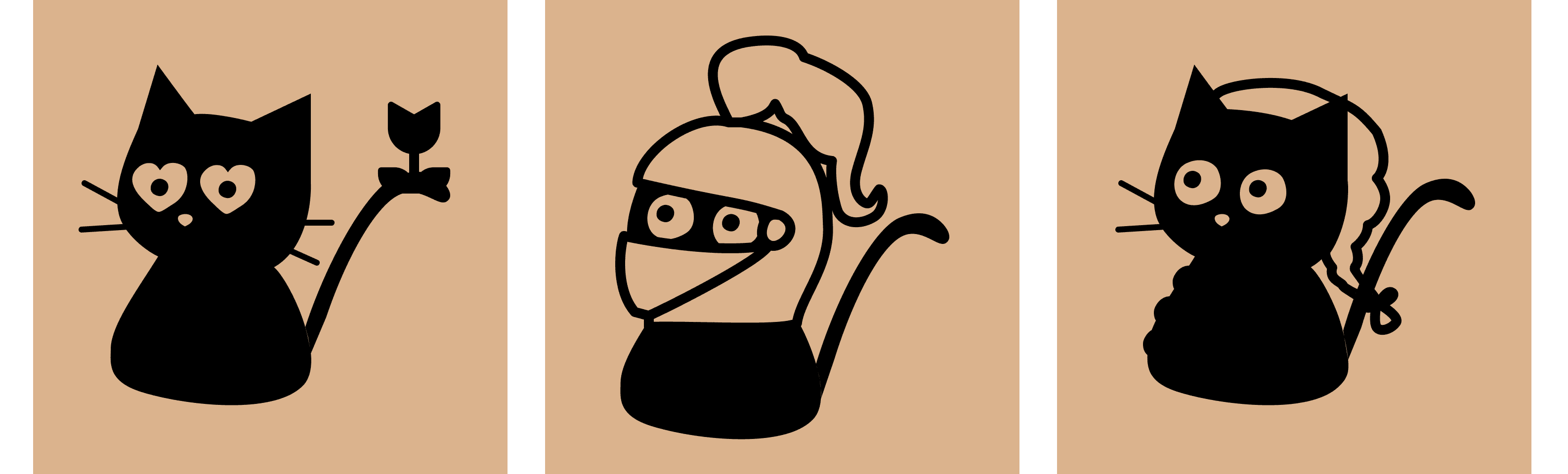
Cat Board features a creative, distinctive identity built around a cats-and-keyboards theme, inspired by the familiar habit of cats sitting on keyboards while people write. This motif informed the app’s name, logo, and genre icons, creating a cohesive and memorable brand.
Beyond visuals, Cat Board focuses on innovation in user motivation by exploring new ways to encourage thoughtful, high-quality feedback—helping the platform stand apart from competitors while strengthening community trust.


Plotting the Journey
Four Main Flows
Signing Up Flow: making an account, choosing preferences for the types of writing projects
Giving feedback on other users' writing projects
Posting their own writing project
Messaging a fellow writer
Posting their own writing project
Messaging a fellow writer
Design
Design Choices That Drive the User Story
Next Steps
I sketched layouts for each screen
I created user flows: Sign up, Giving feedback, Posting a story, and Messaging
I moved sketches to Figma, and prototyped into testable flows
I conducted unmoderated testing
I iterated through low-, mid-, and high-fidelity designs, refining the experience at each stage
Testing
Polishing the Pages
I conducted moderated testing over Zoom video calls with the same users.
Checking messages
Sign up flow
Giving feedback
Posting a story
The study included four amateur writers— from casual hobbyists to professional publishing experience
Highly positive feedback
100% completion rate
Tasks completed under 1 minute
The most significant design changes, along with the rationale behind them, are outlined below.
Bottom Nav Bar
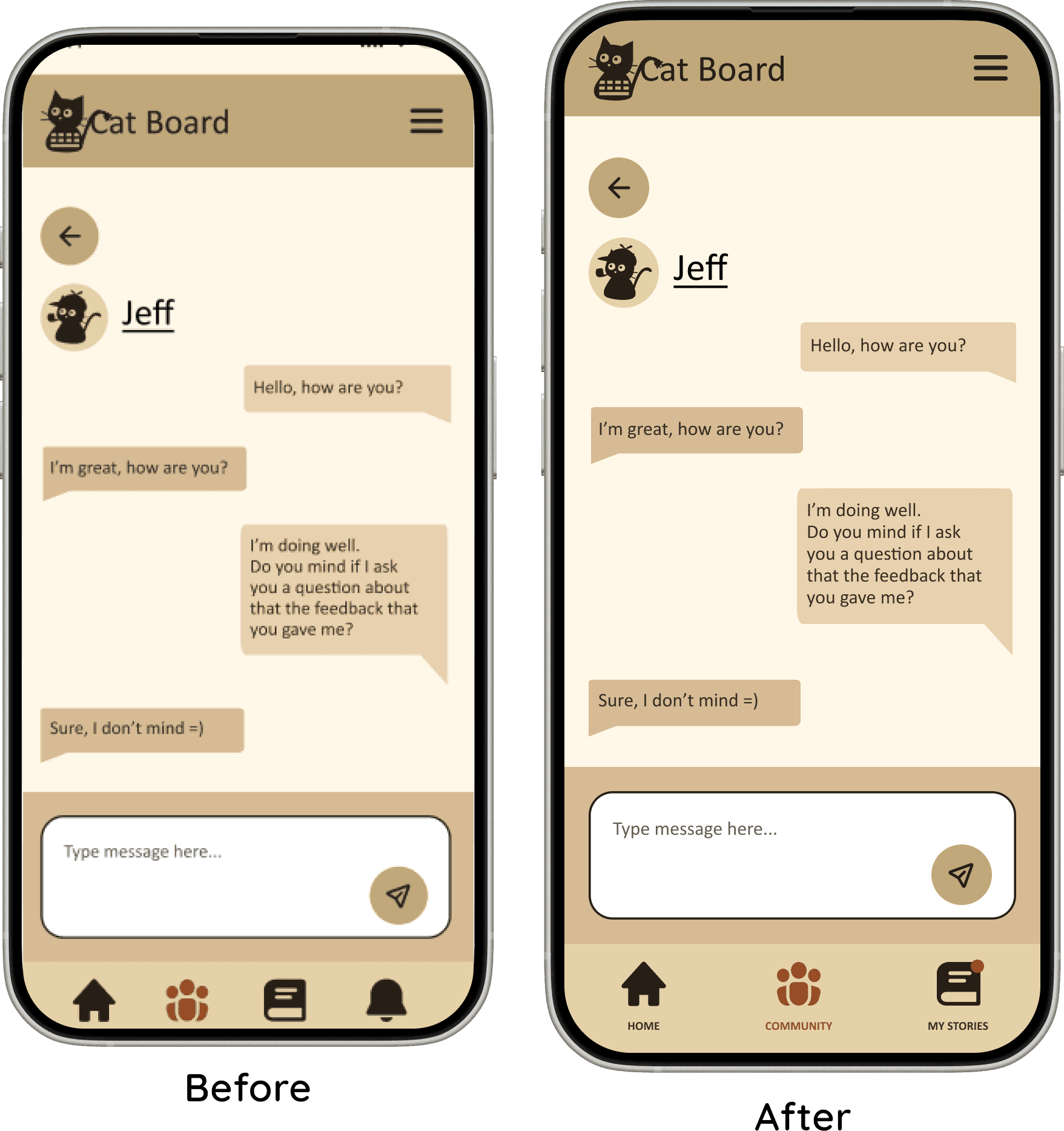
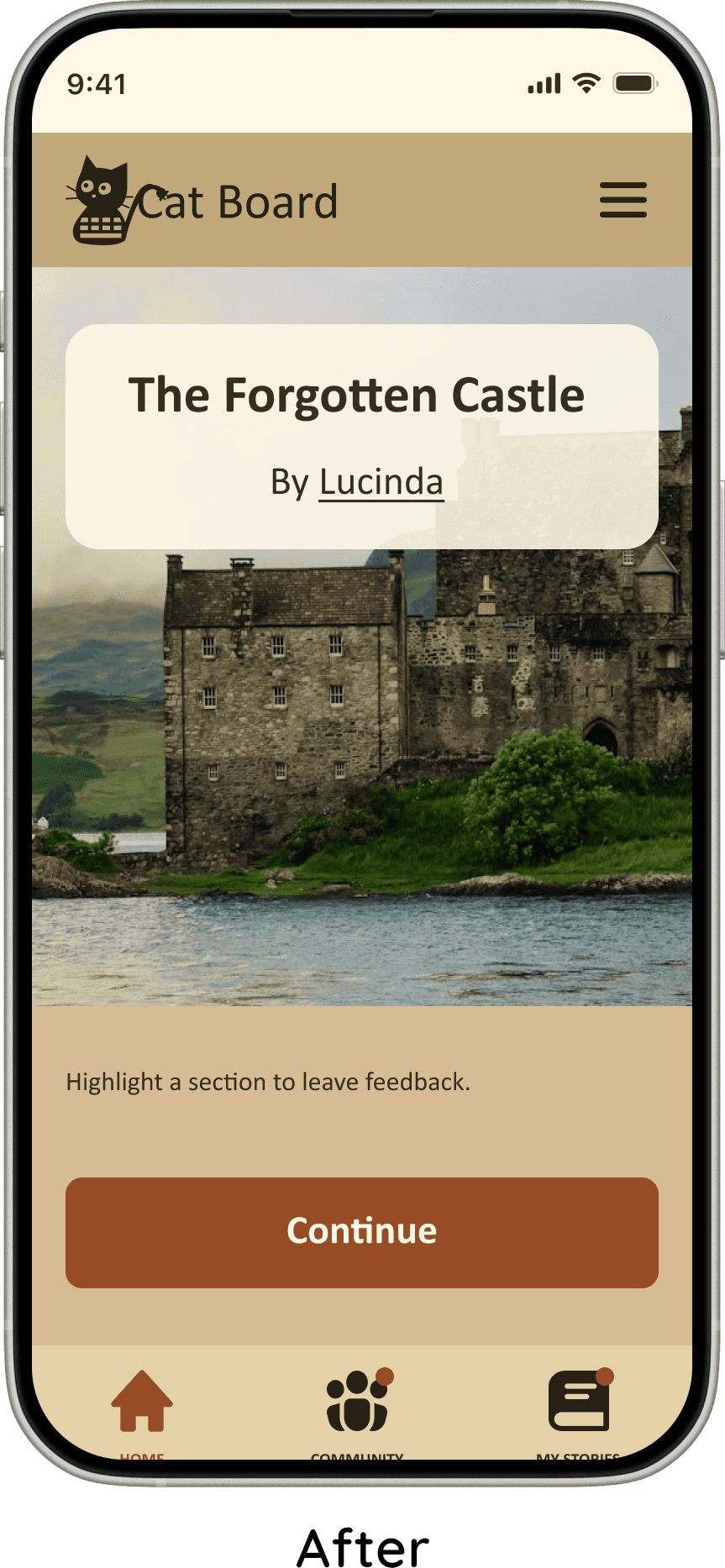
I redesigned the bottom navigation to reduce confusion around messaging. Users were unsure whether to look for messages under Community or Notifications.
I removed the notifications tab entirely. I instead used notification badges directly on designated nav items.
Messages from friends now shows notification badge on the Community icon. Feedback on stories shows on the My Stories icon.
Improving Button Experience
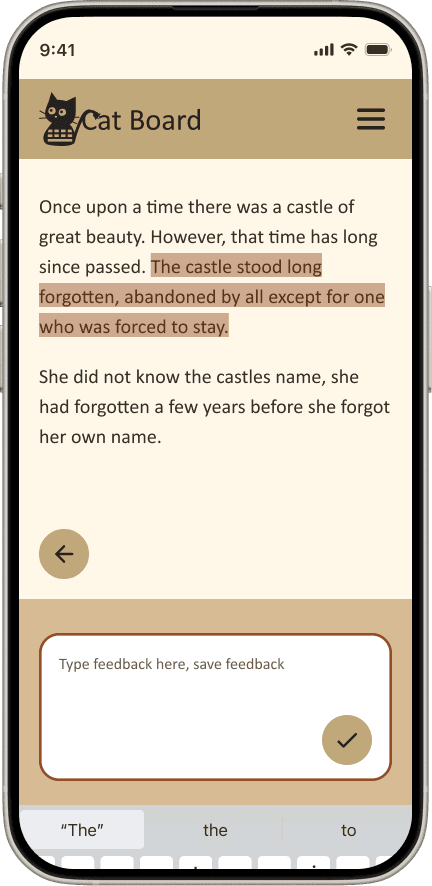
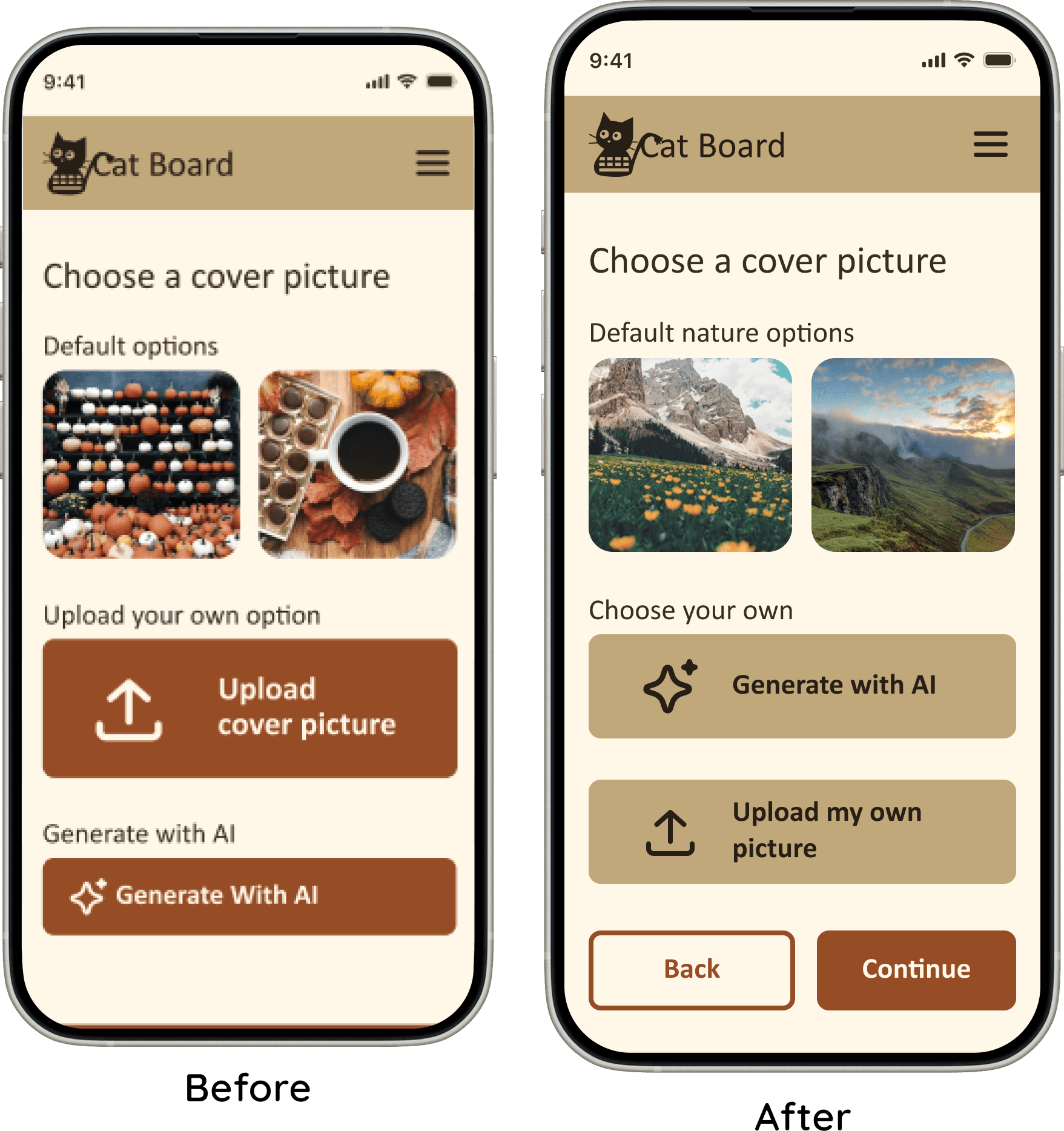
I added back buttons to the flows with multiple steps, allowing users to recover from mistakes without needing to restart.
I increased the visual differentiation between primary and secondary buttons. This helped users more easily identify key actions, improving clarity and reducing hesitation during decision-making.
Story Cover Screens
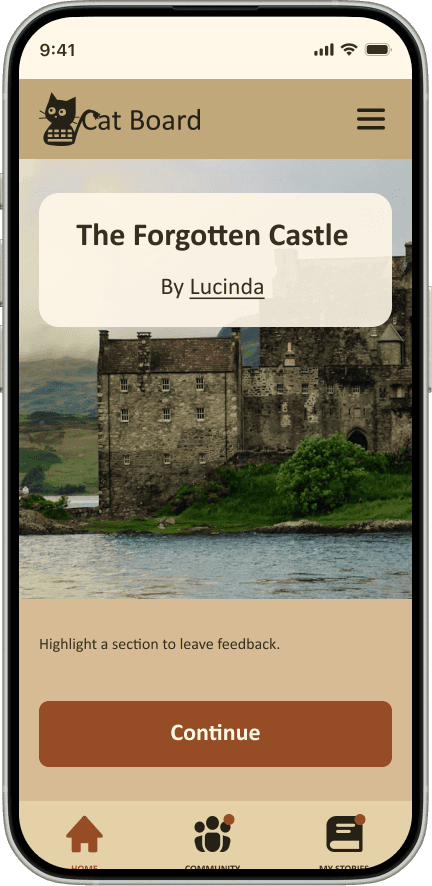
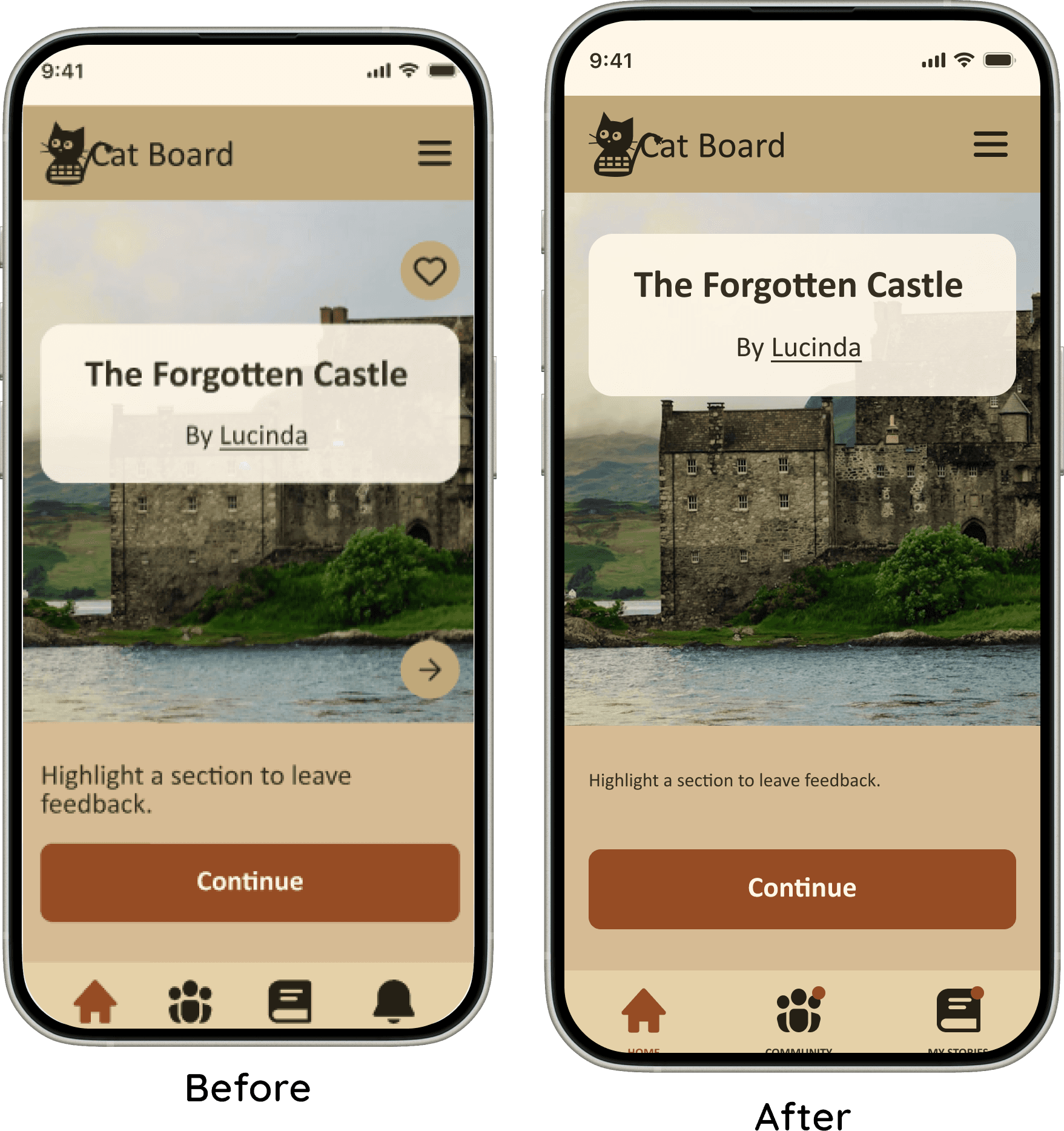
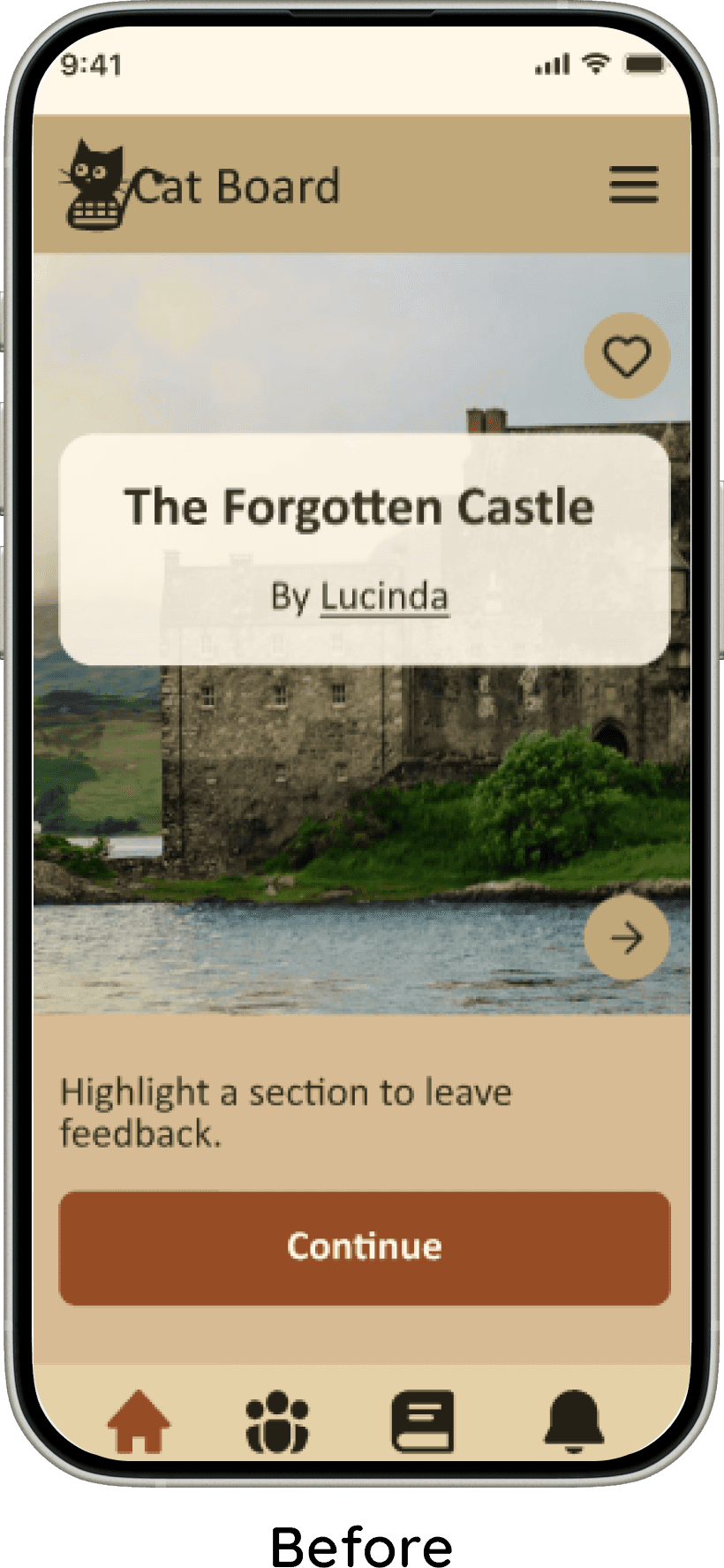
Some users were unsure if the “Next” and “Continue” buttons led to different results. The rest of the users felt the buttons were redundant. To resolve this, I removed the “Next” button and retained a single, clear “Continue” action.
Additionally, I made it so that users could save/like the story once they had finished reading it. This created a more natural flow.
Both changes reduced visual clutter to the story's covers.
Feedback Summary Screen
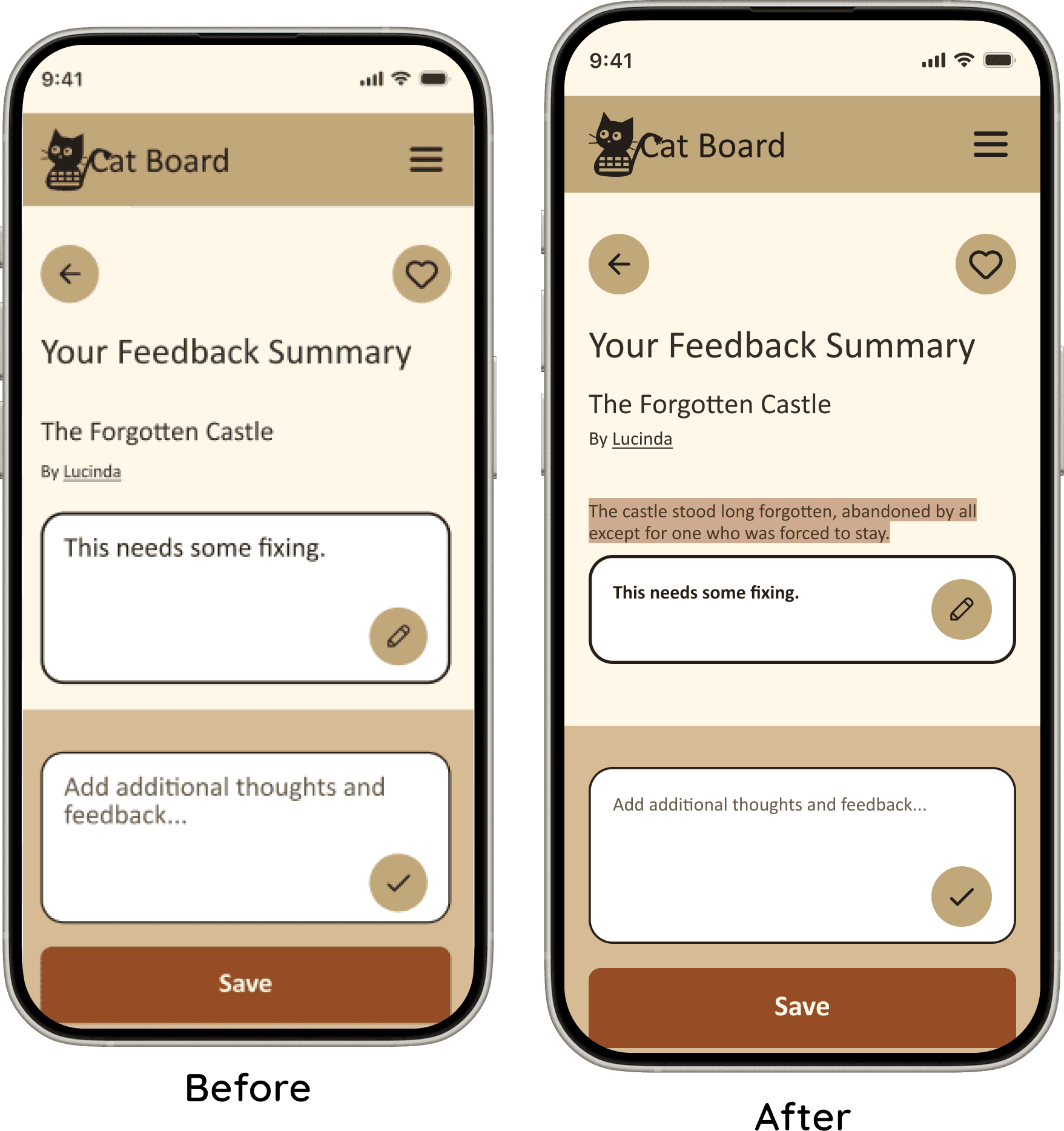
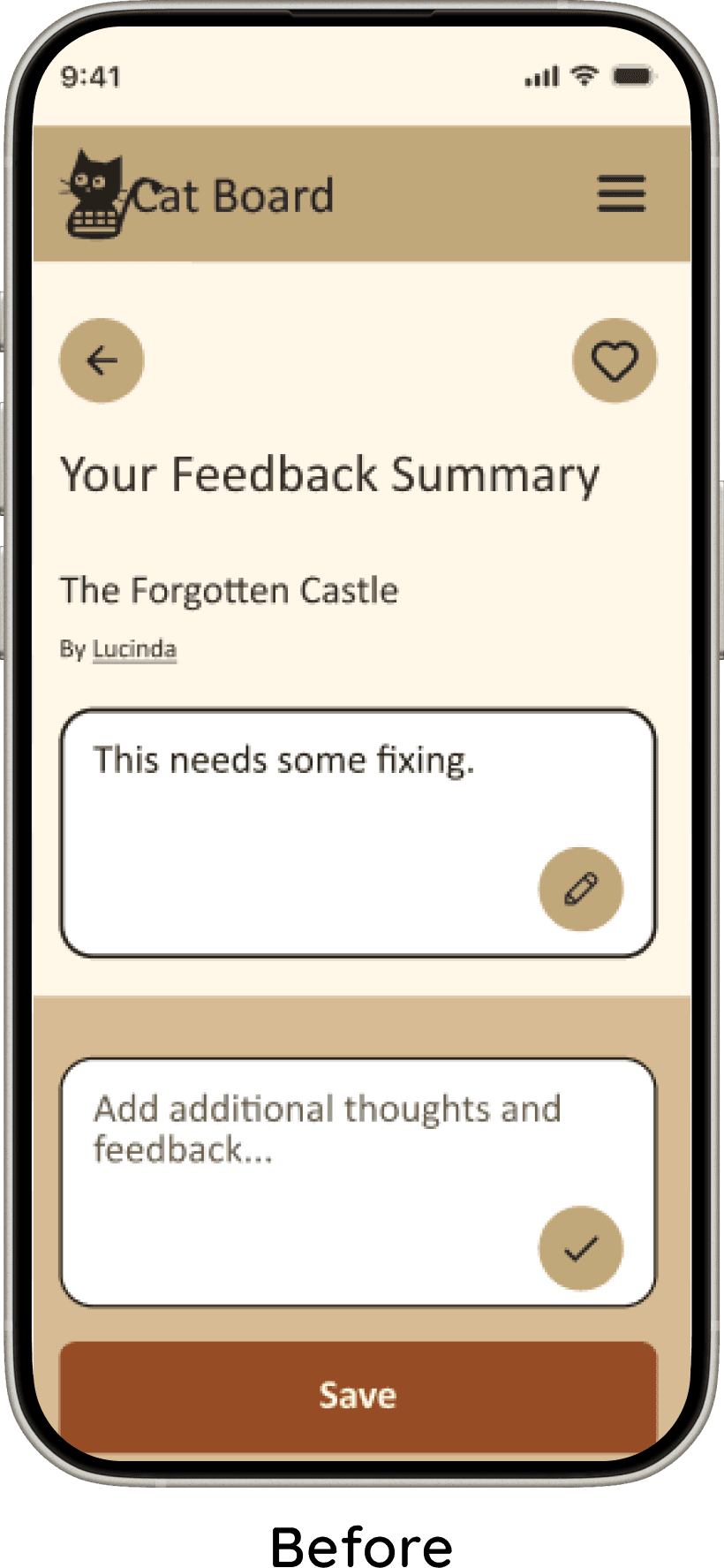
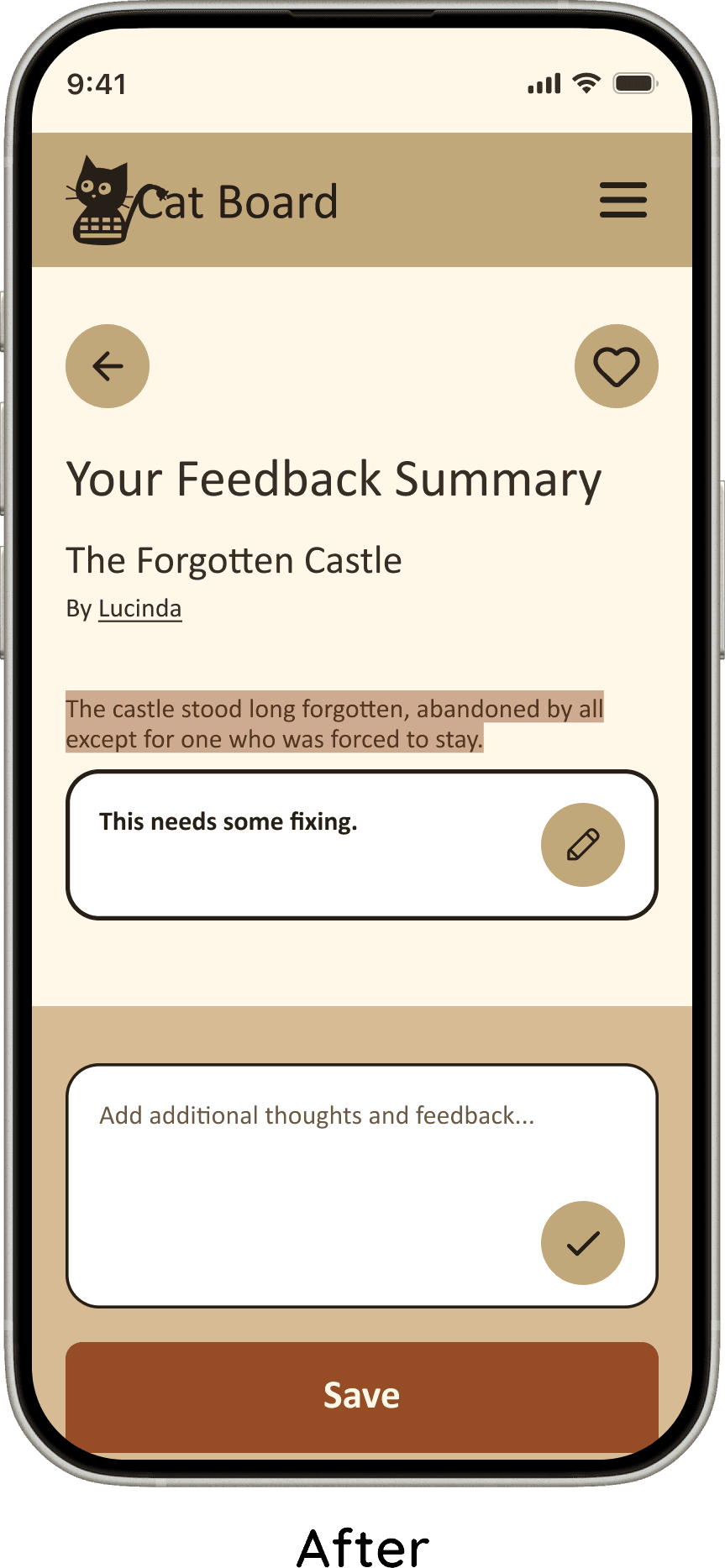
I differentiated the “Add Feedback” and “Edit Feedback” input fields, by reducing the size of the edit feedback field and applying a bolder outline.
I also added the section of the story the user commented on, located directly above the "Edit Feedback" field. This ensured that when editing their feedback, users retained clear context about what their comment referred to.
Testing
Polishing the Pages
I conducted moderated testing over Zoom video calls with the same users.
Checking messages
Sign up flow
Giving feedback
Posting a story
The study included four amateur writers— from casual hobbyists to professional publishing experience
Highly positive feedback
100% completion rate
Tasks completed under 1 minute
The most significant design changes, along with the rationale behind them, are outlined below.
Final Product
Clear Purpose & Intuitive Navigation
Users immediately understood the purpose of the app and felt confident navigating the flows. The concept resonated quickly and clearly.
Memorable Visual Design
The visual design made a strong impression. The cats-and-keyboards theme felt memorable and charming, supported by warm, bookish colors and a clean, uncluttered layout. Custom cat genre icons were a standout detail—one user noted, “I love the cat icons, I can’t believe you made them.”
Engaging Posting & Feedback Tools
Posting and feedback features kept users engaged. Cover images added personality to writing projects, the AI-generated cover option sparked excitement, and project preference settings gave users greater control over how their work was shared and reviewed.
Strong Community Connection
Community features proved especially compelling. Users enjoyed friending and messaging other writers and found the forums valuable for asking questions, exchanging insights, and staying connected.
Clear Purpose & Intuitive Navigation
Users immediately understood the purpose of the app and felt confident navigating the flows. The concept resonated quickly and clearly.
Engaging Posting & Feedback Tools
Posting and feedback features kept users engaged. Cover images added personality to writing projects, the AI-generated cover option sparked excitement, and project preference settings gave users greater control over how their work was shared and reviewed.
Strong Community Connection
Community features proved especially compelling. Users enjoyed friending and messaging other writers and found the forums valuable for asking questions, exchanging insights, and staying connected.
Memorable Visual Design
The visual design made a strong impression. The cats-and-keyboards theme felt memorable and charming, supported by warm, bookish colors and a clean, uncluttered layout. Custom cat genre icons were a standout detail—one user noted, “I love the cat icons, I can’t believe you made them.”
Conclusion
Every Story Needs a Purpose
I enjoyed designing an app with a purpose that felt personally meaningful. Writing is one of my favorite hobbies, as well as my husband’s, and it’s a way we connect. I hope Cat Board helps other writers build similar connections while moving closer to sharing their stories with the world.
This project also marked meaningful growth in my design practice. Increased confidence allowed me to work more efficiently and with less stress, avoiding mistakes I had encountered in earlier projects. With fewer roadblocks, I was able to focus more time on refinement—ensuring the experience worked smoothly and felt visually cohesive—rather than troubleshooting preventable issues.
Every Story Needs a Purpose
Conclusion
Final Product
Engaging Posting & Feedback Tools
Posting and feedback features kept users engaged. Cover images added personality to writing projects, the AI-generated cover option sparked excitement, and project preference settings gave users greater control over how their work was shared and reviewed.
Strong Community Connection
Community features proved especially compelling. Users enjoyed friending and messaging other writers and found the forums valuable for asking questions, exchanging insights, and staying connected.
Memorable Visual Design
The visual design made a strong impression. The cats-and-keyboards theme felt memorable and charming, supported by warm, bookish colors and a clean, uncluttered layout. Custom cat genre icons were a standout detail—one user noted, “I love the cat icons, I can’t believe you made them.”
Clear Purpose & Intuitive Navigation
Users immediately understood the purpose of the app and felt confident navigating the flows. The concept resonated quickly and clearly.
Conclusion
I enjoyed designing an app with a purpose that felt personally meaningful. Writing is one of my favorite hobbies, as well as my husband’s, and it’s a way we connect. I hope Cat Board helps other writers build similar connections while moving closer to sharing their stories with the world.
This project also marked meaningful growth in my design practice. Increased confidence allowed me to work more efficiently and with less stress, avoiding mistakes I had encountered in earlier projects. With fewer roadblocks, I was able to focus more time on refinement—ensuring the experience worked smoothly and felt visually cohesive—rather than troubleshooting preventable issues.
Every Story Needs a Purpose
Design
Design Choices That Drive the User Story
Next Steps
I sketched layouts for each screen
I created user flows: Sign up, Giving feedback, Posting a story, and Messaging
I moved sketches to Figma, and prototyped into testable flows
I conducted unmoderated testing
I iterated through low-, mid-, and high-fidelity designs, refining the experience at each stage
Define
Wrestling With Motivation, Page by Page
Prioritized Features chosen to support and connect amateur writers
Feature for sharing stories, giving and receiving writing projects
Forum feature: to give amateur writers a way to ask each other writing related questions and provide advice
Messages: users able to connect with other writers on a more personal level, providing them a chance to have a writing partner
Cover images: users stated that they liked being able to add pictures to their writing projects, to add to the add visual appeal
Your Stories, Our Mission
To support writer growth, the platform prioritizes connection and communication through community features such as messaging, forums, writer connections, and peer feedback.
Supportive collaboration
A points-based system encourages users to provide thoughtful, constructive reviews, fostering trust across the platform.
Integrity
Inviting and Friendly
Cat Board is designed with a warm, approachable personality intended to feel inviting and charming to its users. This personality is expressed through thoughtful color choices, visual styling, and a cohesive theme. Typography was selected to balance warmth and approachability with clarity and legibility, ensuring the interface feels welcoming without sacrificing usability.
Imaginative and Innovative
Cat Board features a creative, distinctive identity built around a cats-and-keyboards theme, inspired by the familiar habit of cats sitting on keyboards while people write. This motif informed the app’s name, logo, and genre icons, creating a cohesive and memorable brand.
Beyond visuals, Cat Board focuses on innovation in user motivation by exploring new ways to encourage thoughtful, high-quality feedback—helping the platform stand apart from competitors while strengthening community trust.
Plotting the Journey
Four Main Flows
Signing Up Flow: making an account, choosing preferences for the types of writing projects
Giving feedback on other users' writing projects
Posting their own writing project
Messaging a fellow writer
Testing
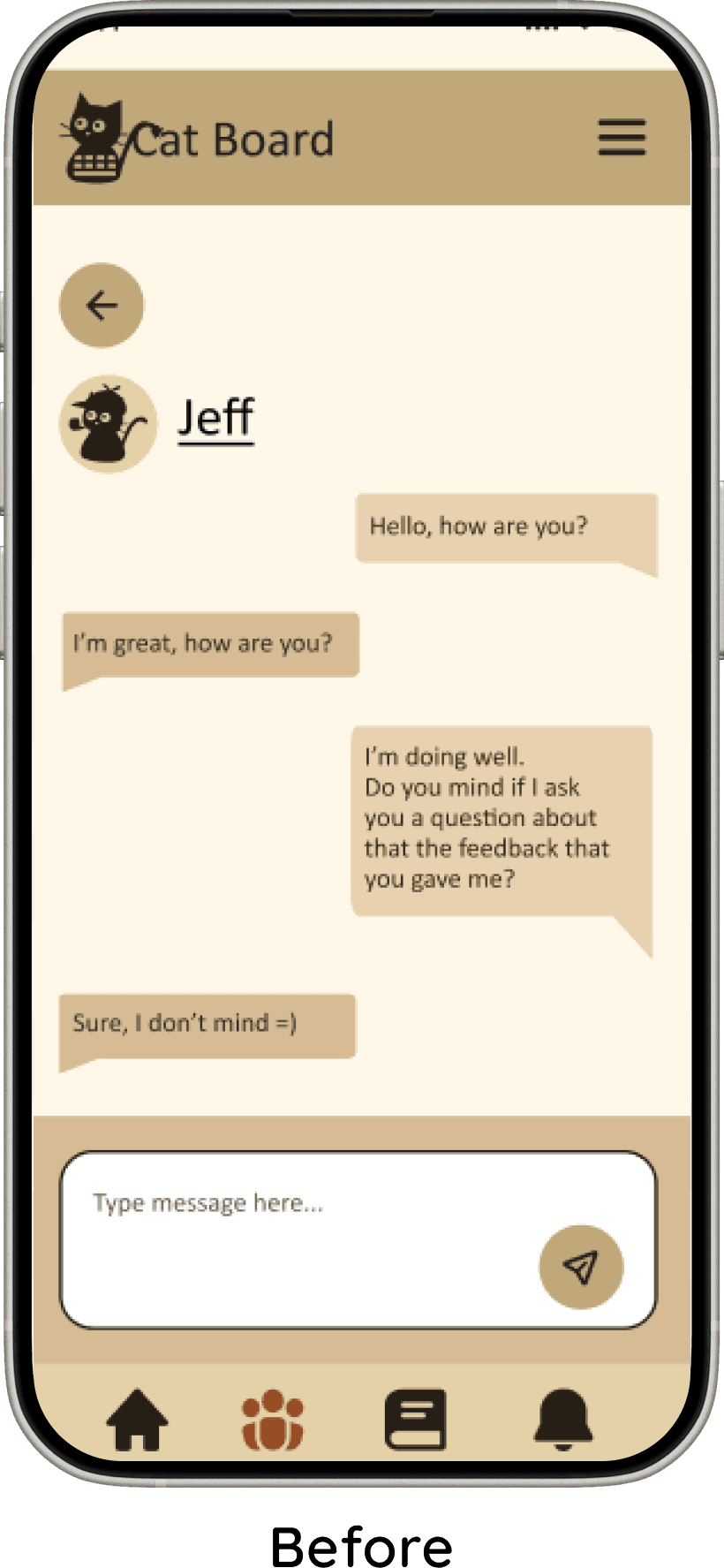
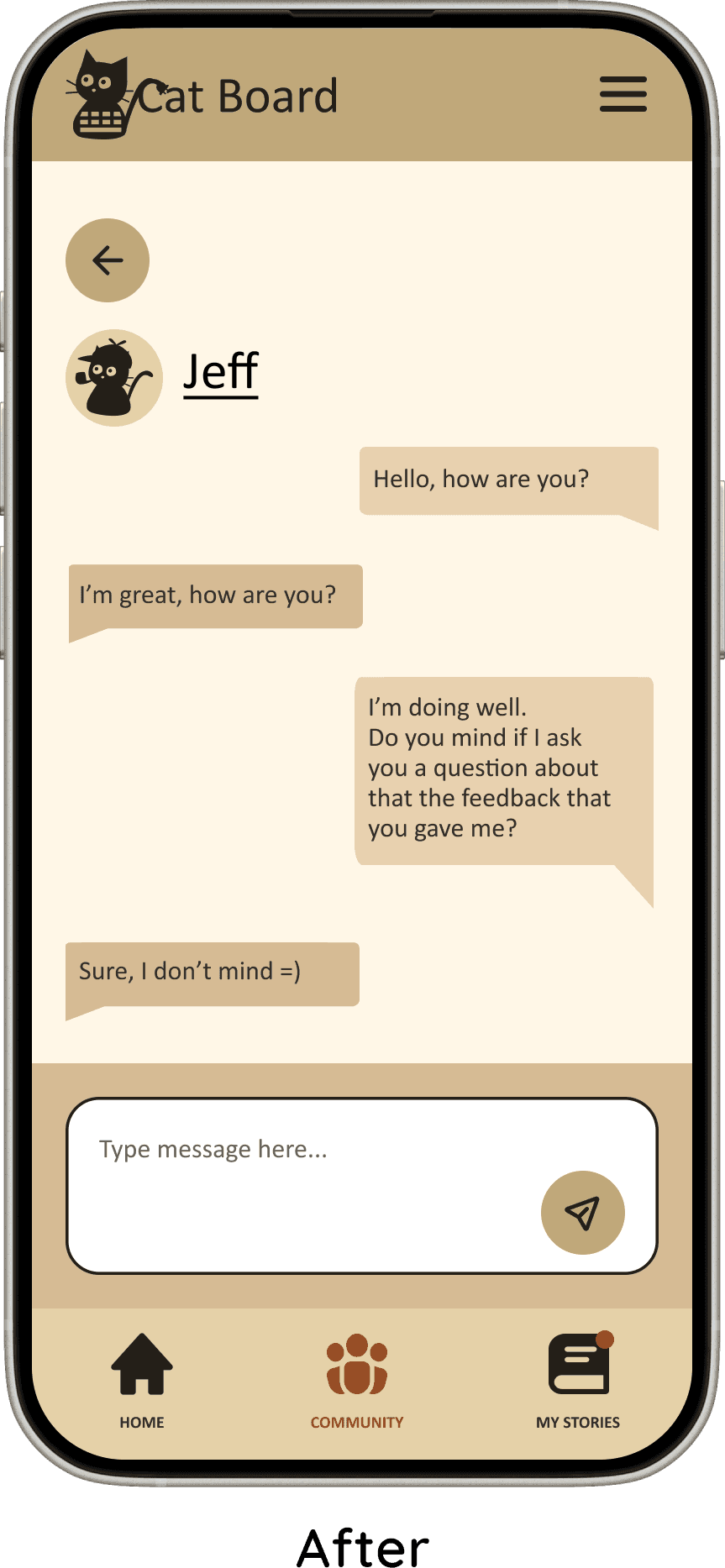
Bottom Nav Bar
I redesigned the bottom navigation to reduce confusion around messaging. Users were unsure whether to look for messages under Community or Notifications.
I removed the notifications tab entirely. I instead used notification badges directly on designated nav items.
Messages from friends now shows notification badge on the Community icon. Feedback on stories shows on the My Stories icon.
Improving Button Experience
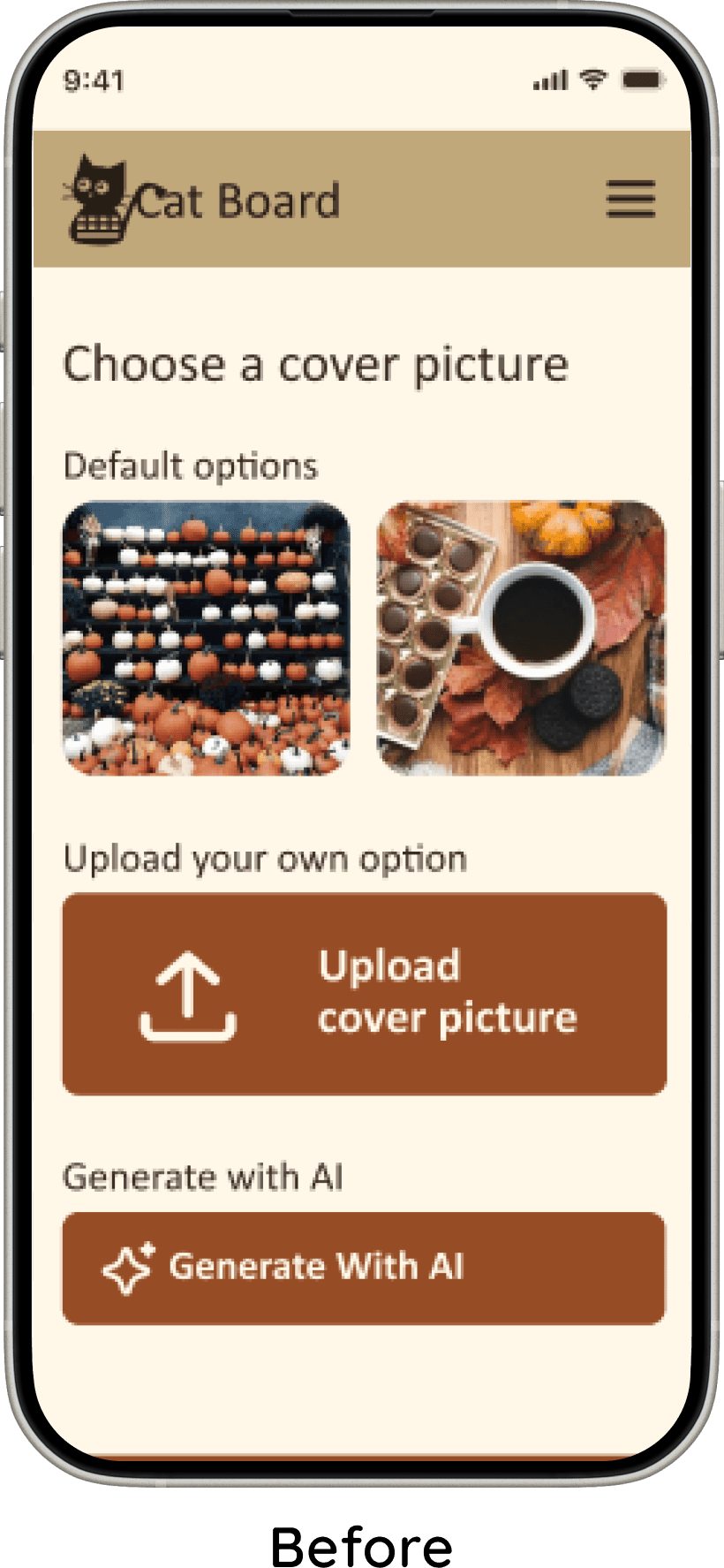
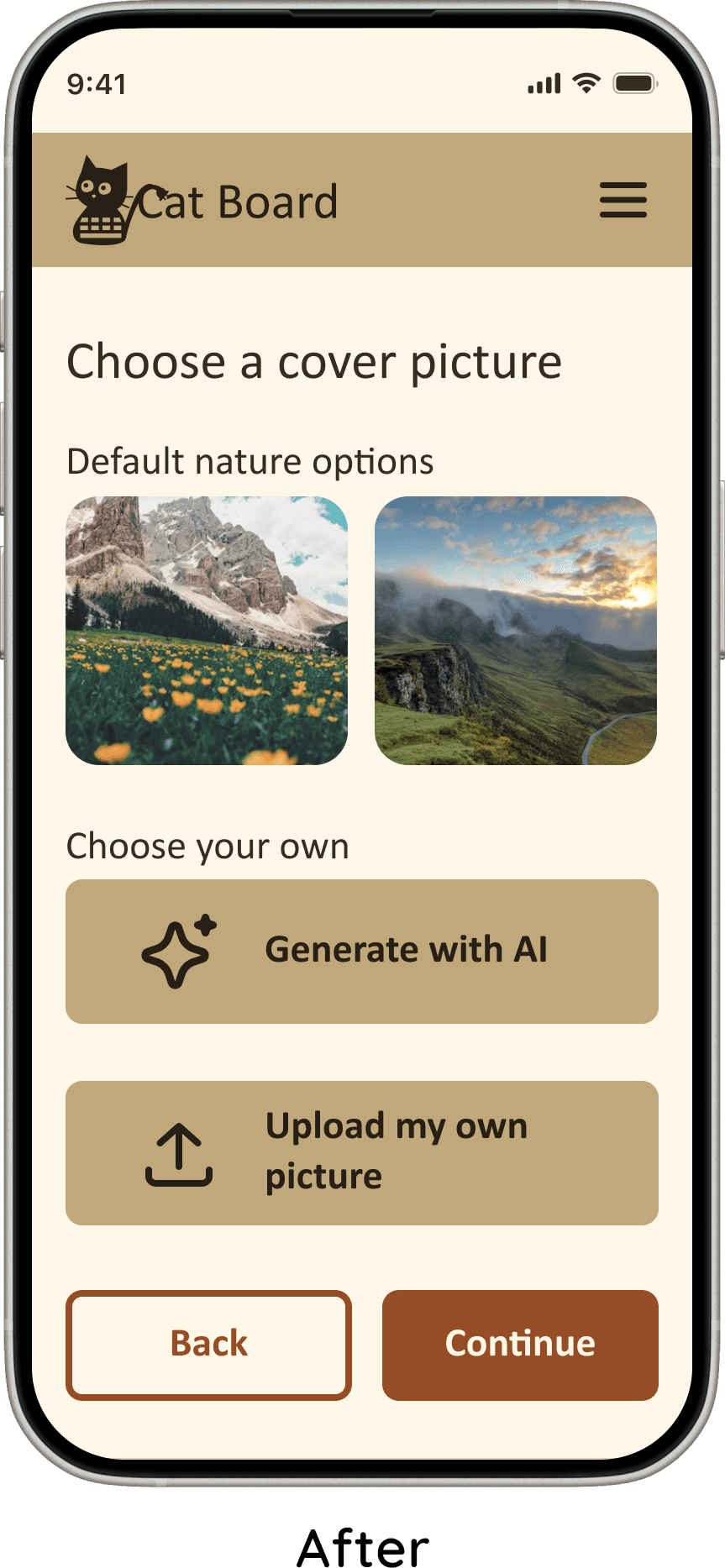
I added back buttons to the flows with multiple steps, allowing users to recover from mistakes without needing to restart.
I increased the visual differentiation between primary and secondary buttons. This helped users more easily identify key actions, improving clarity and reducing hesitation during decision-making.
Story Cover Screens
Some users were unsure if the “Next” and “Continue” buttons led to different results. The rest of the users felt the buttons were redundant. To resolve this, I removed the “Next” button and retained a single, clear “Continue” action.
Additionally, I made it so that users could save/like the story once they had finished reading it. This created a more natural flow.
Both changes reduced visual clutter to the story's covers.
Feedback Summary Screen
I differentiated the “Add Feedback” and “Edit Feedback” input fields, by reducing the size of the edit feedback field and applying a bolder outline.
I also added the section of the story the user commented on, located directly above the "Edit Feedback" field. This ensured that when editing their feedback, users retained clear context about what their comment referred to.
Polishing the Pages
I conducted moderated testing over Zoom video calls with the same users.
Checking messages
Sign up flow
Giving feedback
Posting a story
The study included four amateur writers— from casual hobbyists to professional publishing experience
Highly positive feedback
100% completion rate
Tasks completed under 1 minute
The most significant design changes, along with the rationale behind them, are outlined below.